Your household's mental load, finally shared.
Split the bills, share the cleaning rota, stop chasing each other for rent — tasks, meals, and the budget in one shared view, no awkward texts.
DueCroft
Budget left
This month
Today
Who it's for
Whichever shape your household is, it works the same way.
Couple
Just the two of you
Still splitting it evenly — even when life gets busy.
Couple, shared
Groceries · October
£260 / £400
What it solves
The stuff that usually lives in one person's head.
Hand off anything on your mind
Add a task, pick who it's for, set a reminder. It's off your plate and onto theirs — with a category and a nudge attached, not just a text message that gets lost.
Plan the week's meals together
A shared lunch-and-dinner grid for the week ahead — either of you can fill in a day, so “what are we eating” stops being a daily negotiation.
One household budget, everyone sees it
Set a monthly amount. Log spend as it happens — the whole household sees what's left, live, instead of finding out at the end of the month.
Know what's coming, not just what's late
A rolling calendar shows today, this week, or the next 30 days at a glance — overdue actually looks different from just-due-later.
How much are you holding?
Tap what's actually on your plate.
Not the abstract idea of "mental load" — the specific things you're personally keeping track of right now.
0
Tap the ones that are actually on your plate right now.
The honest comparison
Not another group chat.
A WhatsApp group works until the task you sent scrolls past three photos and a meme. A Notes doc works until it's out of date and nobody's sure whose version is current. DueCroft is built to just be right, for both of you, all the time.
| WhatsApp group | Notes app | DueCroft | |
|---|---|---|---|
| Reminds someone automatically | |||
| Assigns a task to one person | |||
| Shared, live household budget | |||
| A shared weekly meal plan | |||
| Stays organised, doesn't scroll away | |||
| Everyone sees the same up-to-date picture |
See it in action
The actual app, not a mock-up.
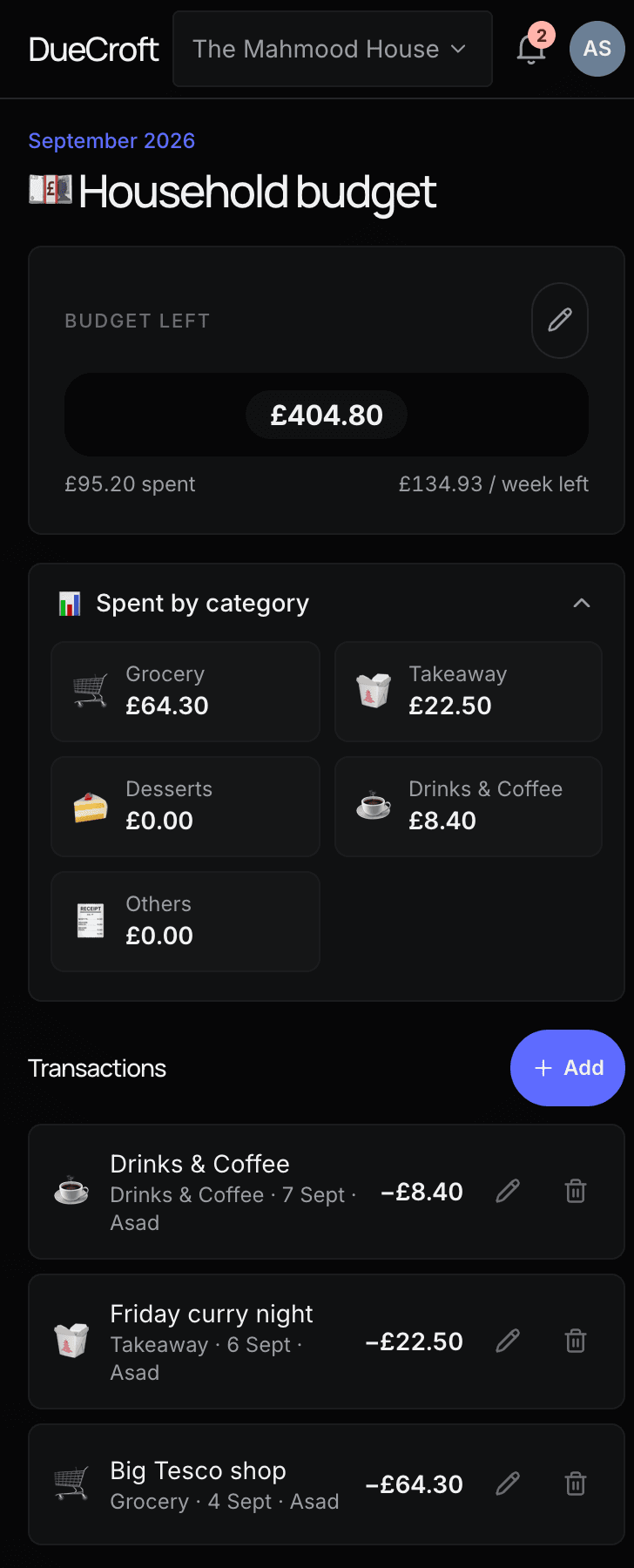
Budget, live
Set it once. It updates itself.
- Set a monthly amount — however much works for you.
- Log a spend the moment it happens: grocery, takeaway, whatever it was.
- The total updates immediately — everyone sees what's left, live, no one has to ask.
Tasks, assigned
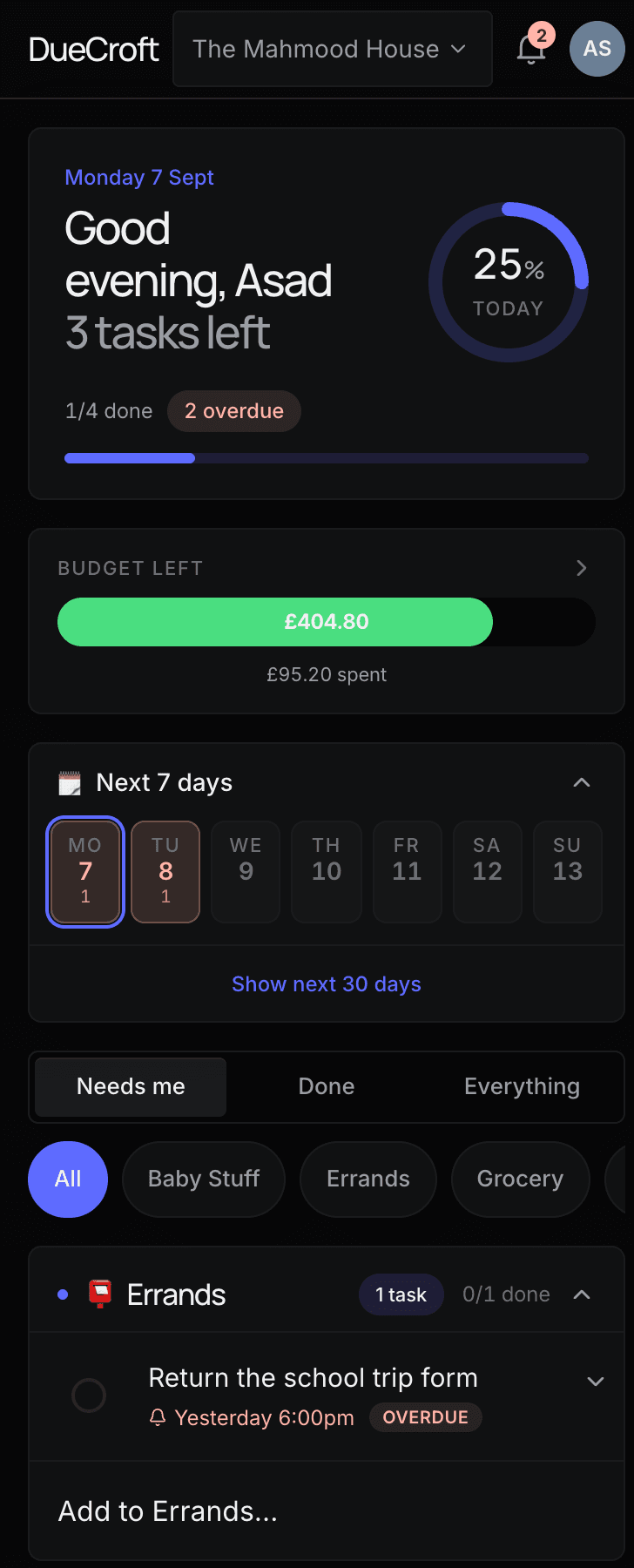
Off your plate, onto theirs.
- Add a task and pick exactly who it's for.
- Set a reminder so it doesn't quietly slide into overdue.
- One tap marks it done — for both of you, at once.
How it works
Five minutes to get your household in sync.
- 1
Create your household
Give it a name — you're the main admin from the start.
- 2
Invite your people
Partner, housemates, family — they get a sign-in link by email, no password to set up.
- 3
Hand off tasks as they come up
Whoever thinks of it adds it, assigns it, and moves on. One tap to mark it done.
- 4
Plan meals and set a budget
Fill in the week's lunches and dinners, and log spend against grocery, takeaway, or anything else.
- 5
Stay in sync, automatically
Everyone's plate updates live — no refreshing, no asking, no "did you see my message?"
Feels like an app
Add it to your home screen.
DueCroft runs entirely in the browser — no App Store, nothing to approve, no waiting for an update to ship. Add it to your home screen and it opens full screen with its own icon, exactly like an installed app.
iPhone
- 1.Open duecroft.com in Safari
- 2.Tap Share, then “Add to Home Screen”
- 3.Tap Add — that's it
Android
- 1.Open duecroft.com in Chrome
- 2.Tap the menu, then “Install app” (or “Add to Home screen”)
- 3.Confirm — it's added
Desktop
- 1.Open duecroft.com in Chrome or Edge
- 2.Look for the install icon in the address bar
- 3.Click it and confirm
Where the name comes from
Due.
The tasks that are always due — the bins, the bill, the form that was due last Tuesday.
Croft.
A small plot of land a Scottish household worked and tended together — one shared patch of ground, everyone's job to look after it.
DueCroft started as a way to stop one person being the only one who remembers the bins, the budget, and the school form — and to stop household spending living in someone's head until the bank statement shows up. It's in testing with the people who actually live this problem, before it goes any further.
Ready to get your household in sync?
It's currently in testing with friends and family — try it out, and tell us what's missing.
Get started free